


APP BLOCKER

Block Distracting Apps &
Set App Limits

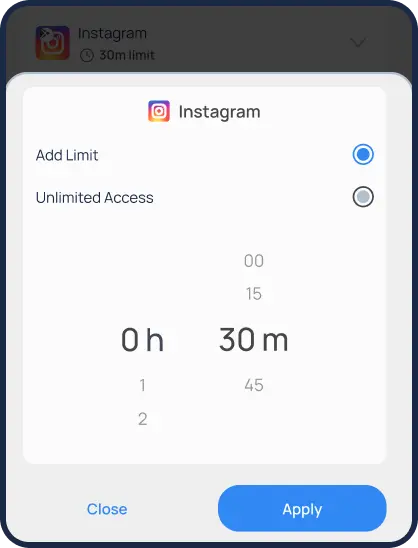
Help kids stay focused by blocking and setting time limits for
specific apps like Facebook or entire categories like
social media, games, and entertainment.

Looking for an easier way to manage your child’s
iOS and Google Play apps?

Mobicip’s App Blocker is your powerful, easy-to-use solution. Gain peace of mind by effortlessly managing app usage, significantly reducing screen time, and fostering healthier digital habits. Whether you need to limit social media exposure, limit gaming hours, or block inappropriate content, Mobicip empowers you to create a safer online world for your family.

Start your free trial and foster a safe and balanced online space for your child.

Key Features of
Mobicip App Blocker

  • Set App Time Limits

    Limit time spent on specific apps like Instagram or entire categories like social media, games, and entertainment.

  • Block Apps & Pre-block Categories

    Block specific apps like Instagram or pre-block entire categories like social media and entertainment.

  • Prevent Unwanted App Usage

    Use preemptive blocking to restrict certain app categories before your child can use them.

  • Real-Time Activity Updates

    Get notified when new apps are installed or used.

  • Cross-Platform Support

    Manage all family devices from one place. Works across iOS, Android, Windows, Kindle Fire, and more.

app blocker

Why Parents Choose Mobicip App Blocker

  • Kevin , Dallas

    Mobicip makes it easy to block harmful apps and set screen time limits. It gives me peace of mind.

  • Amy , Brisbane

    I love receiving usage reports and limiting app access. It really helps us keep our kids safe online.

Frequently Asked
Questions

How does Mobicip’s App Blocker work?

Mobicip enables you to customize app access, set daily time limits for specific app categories, and monitor app usage across all your child’s devices.

Can I block apps on both Android and iOS?

Yes. Mobicip is compatible with Android smartphones/tablets, iPhones, iPads, and Kindle Fire, offering comprehensive coverage across platforms.

Can I stop my child from downloading specific apps?

If your child downloads a new app that falls under the blocked category, they won’t be able to access it. If the app is allowed, its usage will appear in the activity summary.

Trusted by Parents & Recognized by Experts

Family Choice Award

Honoring Excellence

Family Choice Award

Gold Recipient

Family Choice Award

Trusted Provider

Family Choice Award

Satisfaction Guaranteed

Available Across All
Platforms

Download Mobicip on your preferred device:

Works on: iPhones & iPads
Android Phones & TabletsKindle Fire